TL;DR: The form editor now has a built-in AI assistant that answers your questions in real time. You can protect your account with two-factor authentication. And a new Issues page shows you exactly what’s going wrong with your forms.
AI Form Assistant
Setting up forms can involve a lot of moving parts — recipients, auto-response emails, captcha, webhooks, field validation. Instead of digging through documentation, you can now just ask.
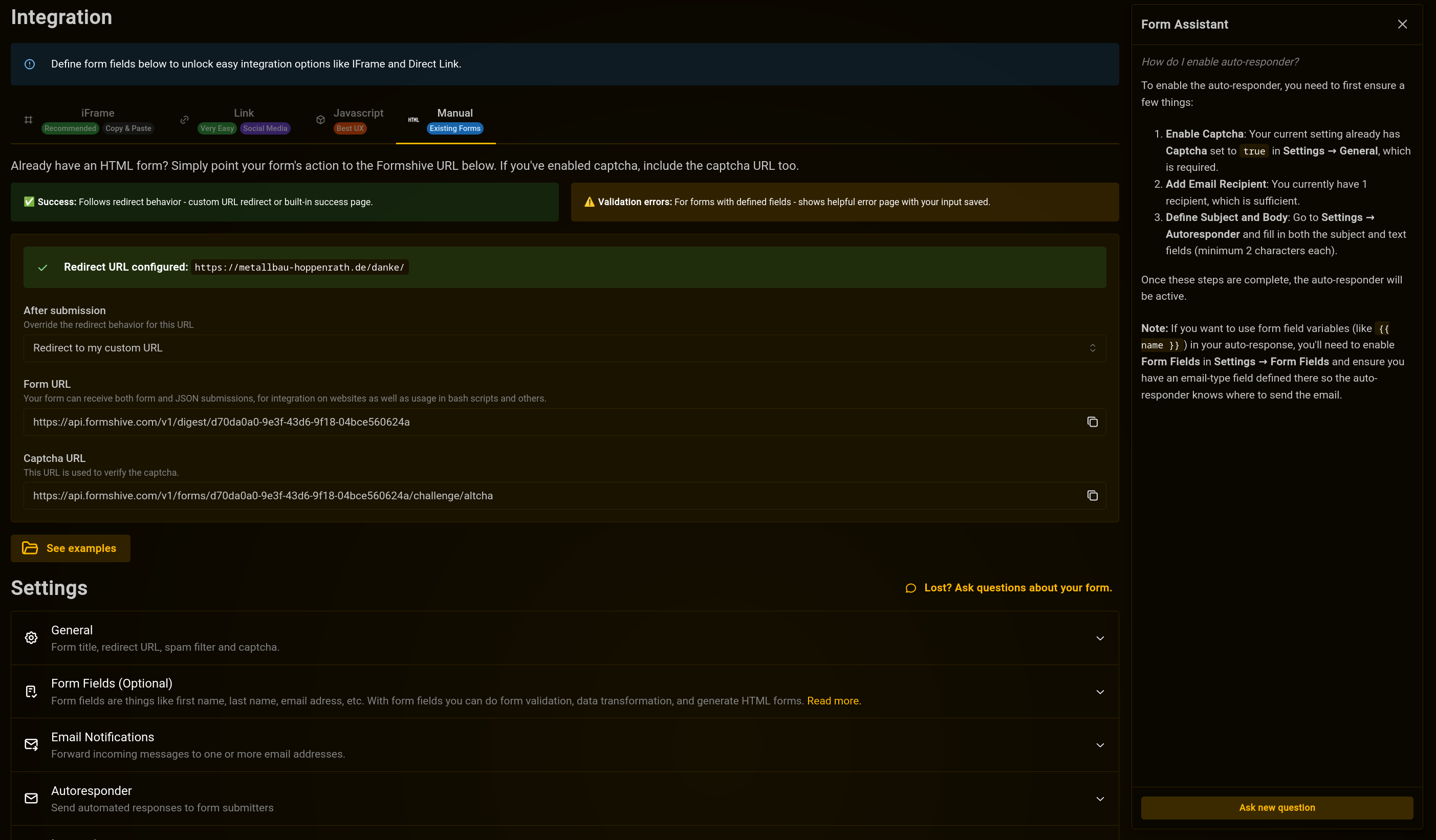
The Form Assistant is a chat panel built right into the form editor. Click the chat icon in the bottom-right corner, type your question, and get an answer that’s specific to your form. It knows your current settings, your fields, and your plan — so the advice is relevant, not generic.
A few things you can ask:
- “How do I set up auto-response emails?”
- “Why isn’t my captcha working?”
- “What integration options do I have?”
- “How do I add file uploads to my form?”
The assistant won’t change your form for you — it explains what to do and where to find the right settings. Think of it as having a knowledgeable guide available whenever you need one.
Two-Factor Authentication
Your Formshive account can now be secured with two-factor authentication (2FA). This adds a second step to your login: after signing in as usual, you’ll be asked for a 6-digit code from an authenticator app on your phone.
Setting It Up
- Go to Settings → Security
- Click Enable Two-Factor Authentication
- Scan the QR code with your authenticator app (Google Authenticator, Authy, or any TOTP-compatible app)
- Enter the 6-digit code to verify
- Save your recovery codes somewhere safe — these are your backup if you lose access to your phone
You’ll get 10 single-use recovery codes. Each one works once, and you can regenerate them at any time from the security settings (you’ll need a valid code to do so).
How Login Changes
Once enabled, every login will prompt you for a code after your usual authentication step. You have 5 minutes to enter it. If you don’t have your authenticator handy, you can use one of your recovery codes instead.
Disabling 2FA
If you need to turn it off, go to Settings → Security, click the remove button on your authentication method, and confirm with a valid code. Straightforward.
Issue Tracking
When something goes wrong with a form submission — a validation error, a failed webhook, a misconfigured auto-response — it used to just… disappear. You’d have to piece together what happened from email notifications or missing data.
The new Issues page changes that. Every problem that occurs during form processing is now logged and visible in one place.
What Gets Tracked
- Validation: A submission was rejected by your field rules, or spam filtering couldn’t run
- Auto-response: Skipped due to missing configuration, invalid email, or captcha not enabled
- Notification: An email notification failed to deliver
- Integration: Credentials rejected, timeout, network error, or misconfigured integration
- Billing: Submission rejected due to insufficient balance or plan limit
What You See
Each issue shows the date, the affected form, the error type and code, and a plain-language description of what went wrong. If the issue was triggered by a specific submission, there’s a direct link to view it.
You can filter between active and dismissed issues, and mark individual issues as resolved once you’ve addressed them.
Staying on Top of Things
The Issues page is especially useful if you’re running multiple forms or integrations. Instead of guessing why submissions aren’t coming through or why auto-responses stopped working, you can check the Issues page and get a clear answer.
Issues from the same form with the same error are throttled — you won’t get flooded with duplicates. But every distinct problem is captured, so nothing slips through the cracks.
Available Now
All three features are live for all Formshive accounts. Head to your form editor to try the AI assistant, enable 2FA in your security settings, or check your Issues page to see if anything needs attention.